All your work, in one place
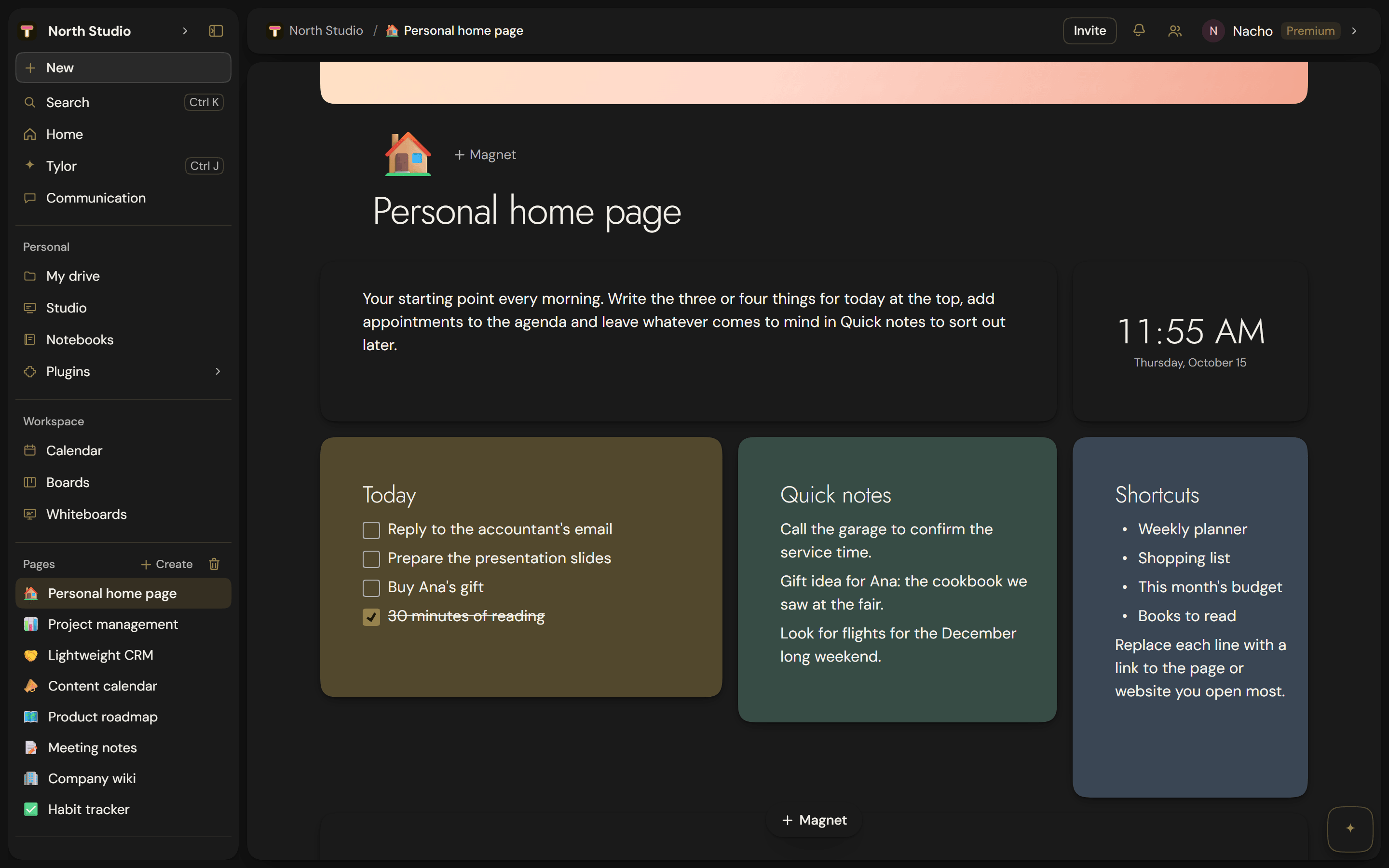
Pages, databases, presentations, whiteboards, calendar and voice channels. One app, one account, one place to search.
No card needed. New accounts try Pro for 7 days, and the free plan doesn't expire. Pricing
All together, and connected because of it
A table from your database goes into a presentation and stays alive: change the data and the slide changes. A page embeds into a whiteboard. A voice channel opens next to whatever you are discussing. None of this is an integration you have to set up — it is that they live in the same place.
When each thing sits in a different program, you can't do that. You copy and paste, and from then on there are two versions of the truth, each with its own password, its own bill and its own name for things.
Coming from Notion?
Bring your pages and databases over in two minutes with the importer, no copy and paste.
How the importer works →Honest pricing, in euros
Free to start, no card. Pro, €9.95 a month. Premium, €19.95 a month. VAT included.
See the plans →Founder offer
Pro at €7/month, forever
Limited places · until October 20
Three spaces, and you always know which one you're in
The awkward question with any shared tool is “who can see this?”. In Tylode you don't have to guess: everything lives in one of these three places, and it shows.
Your personal space
Your drive, your presentations and your calendar. They follow you everywhere, and switching teams doesn't touch them. Nobody else sees them.
The workspace
Pages, databases, whiteboards, calendar and voice channels. Shared with whoever is in it, and switching spaces changes all of it.
Communication
Chats and inbox. The content is yours — you only ever see your own conversations — but it travels with whichever space you're in.
What you can do today
Pages and databases
Write the way you would in a document and, when you need to, turn it into a database with its views, filters and fields. Nothing to export, no switching apps. The same table reads as a list, a board or a calendar depending on what you need that day, and it is still the same table.
Boards
Cards in columns to run any project: drag them from “To do” to “Done” and that's it. Each board has its own named, colored labels, due dates your Home screen reminds you about, and automations for whatever repeats. And if you prefer, the same work can be viewed as a timeline.
Notebooks
Handwritten notes with a stylus or your finger, on lined or grid paper or on top of a PDF: pen, highlighter, text, sticky notes and stickers on the same page. When you need it, turn what you wrote into a Tylode page with the text neatly typed out.
Studio
Presentations, documents, posts and print-ready material, in a real design editor: layers, groups, snapping guides, text effects and entrance animations. Tables and charts can come straight from your own databases, and they update themselves when the data changes.
Whiteboards
Notes, shapes, connectors and Tylode blocks embedded on the same canvas, for whatever doesn't have the shape of a document yet. The pen selects, one finger pans and two fingers zoom, so it works the same on a tablet as with a mouse.
Calendar and voice
Voice channels that stay open, with screen sharing and camera, right beside the pages you are talking about: one click to join, no meeting to create and no link to send. And a calendar that puts the team's next to your own, so you don't have to look in two places to see what today holds.
Extensions
What not everyone needs lives on the side. Turn them on in one click from Settings and they appear in your sidebar; on the free plan, two at a time.
RRSS Planner
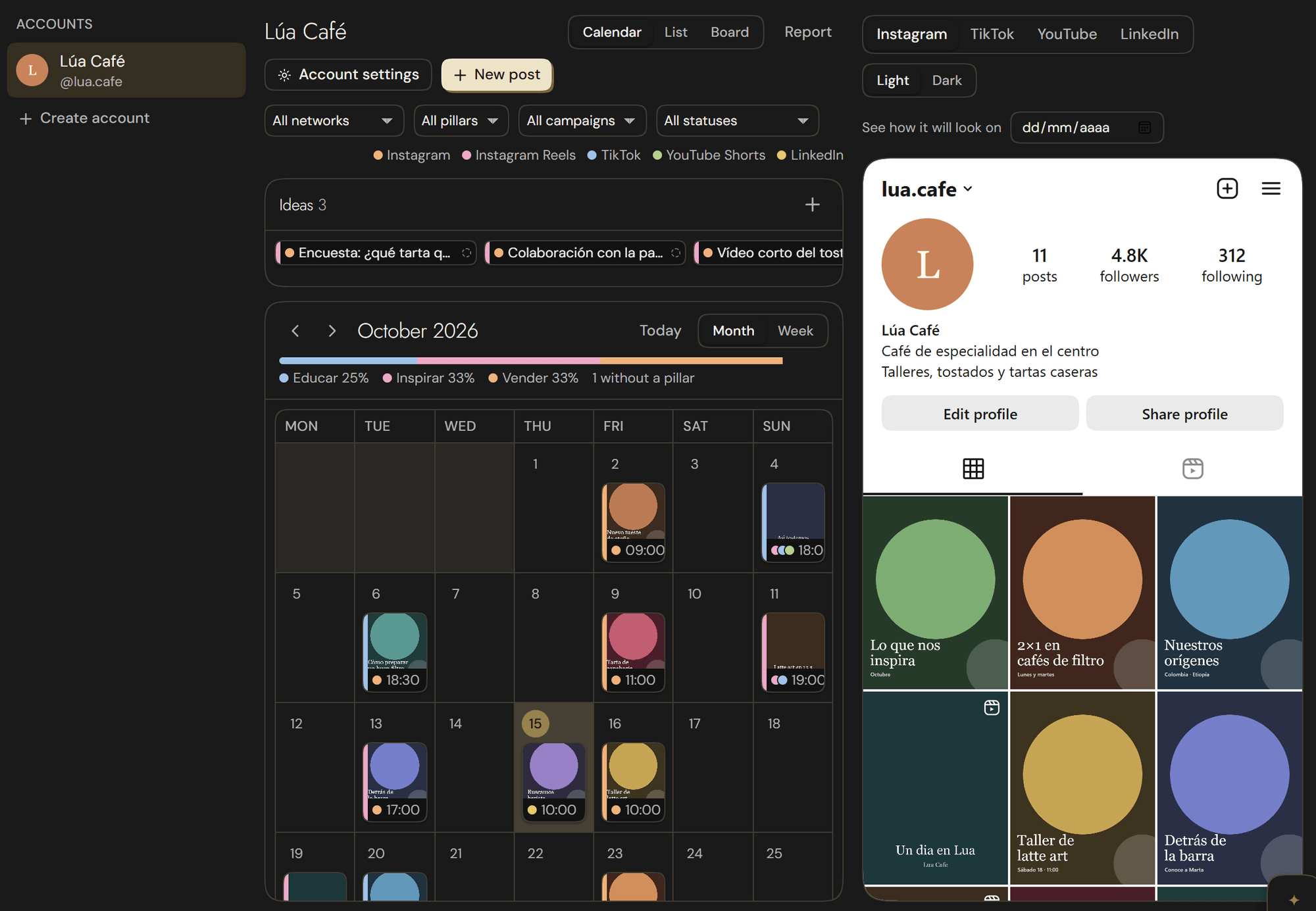
Plan what you'll post on your social media on a calendar and see how your profile will look before you post. Ideas without a date, pillars and campaigns, review and approval with your team, and a link so your client can approve without creating an account.
Notes
A notes marketplace: find other students' PDFs and notebooks and save them to your Tylode as a notebook you can write on. On a paid plan, publish your own.
Timer
A clock to focus in rounds and to track the time you spend on each task, project or client, with reports and what it's worth if you bill by the hour.
Grade average
Add your subjects with their credits and grades: your official average, how far through your degree you are, what average you need for a scholarship or Erasmus, and what you need in the exam to pass.
Invoices
Invoices and quotes with your tax details, clients, series, VAT and IRPF, PDFs with the tax QR code and chained records ready for VeriFactu. You can bill your hours from Timer.
Wherever you work
The same account and the same things everywhere. What isn't here yet, we're already testing.
Browser
On any computer, nothing to install.
Available
Windows
Its own window, system notifications and automatic updates.
Available
Tylode Calendar
Just your calendar, in its own app for Windows and Mac.
Available
Mac
For Macs with Apple silicon: notifications, a badge on the Dock and automatic updates.
Available
iPhone
In its final tests before release.
In progress
Free templates to get started
For your thesis, your exams, your invoices or your clients. Pick one, create your account and it's in your workspace.
- Free thesis planner template for your bachelor's or master's thesisThe outline, the timeline, the bibliography and the meetings with your advisor for your thesis, all together.
- Free exam planner templateYour exams with a countdown for each one and the hours you've studied per course.
- Grade calculator: what grade do you need to pass?Work out where you stand in each course and what grade you need on the final exam to pass.
- Free flashcards with spaced repetitionQuestion-and-answer cards that tell you which day to review each one.
- Free invoice and quarterly VAT tracker for freelancersThe invoices you issue, with the total including VAT calculated, VAT for each quarter, payment status and what you invoice each month.
- Free CRM for freelancers and small teamsCustomers and opportunities by funnel stage, with estimated value, last contact and interaction history.
Made by one person, in Spain
I'm Nacho and I build Tylode on my own, from Spain. I read every message you send me, and a lot of what you ask for ends up in the app.
Try it with something real
Bring over a page, a table or a presentation you already have and see how it looks.
Create a free account